Guided tour
The dashboard, taken apart
Click a dot to see what you are looking at. This is a real screenshot of the app.
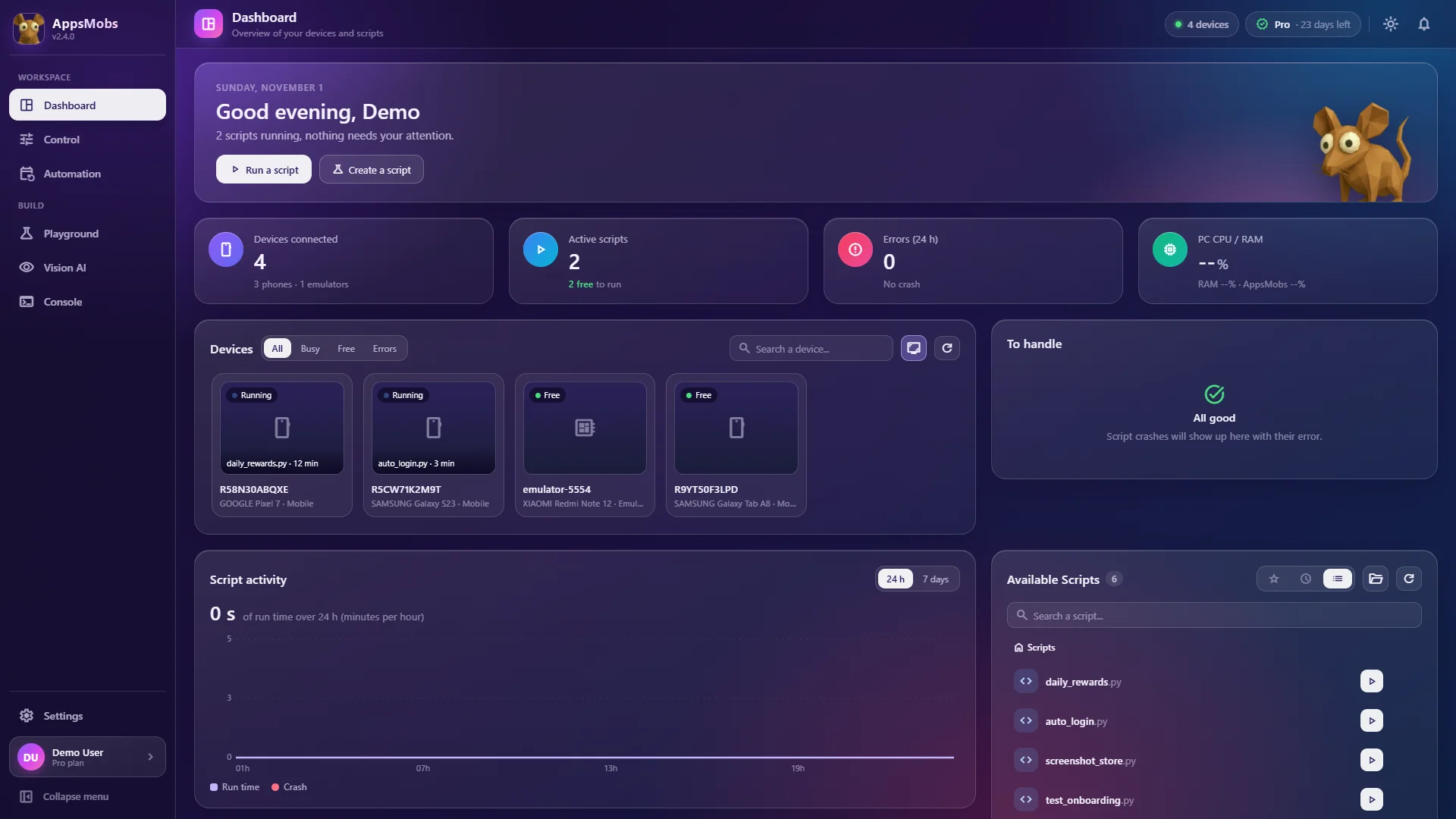
Point 1 of 5
Your devices at a glance
Every plugged-in phone or emulator, its state (free, busy, error) and the script running on it.
Module 01 · Device control
All your screens. Live. Under your fingers.
A grid of live Android screens you actually touch: tap, swipe, long press, text input.
- 01
Fast because it's local
Screens stream as H.264 with per-device FPS and bitrate. Drop background devices to 5 FPS and keep the one you watch at 60.
- 02
No adb call per tap
Gestures don't launch an
adb shell input tapevery time: they land without ADB's startup delay. - 03
USB or emulator
Android 7 to 15, real phones over USB and LDPlayer (other emulators go through ADB, no guarantee). The device list refreshes on its own.
- 04
Take over whenever you want
Pause a script, drive the device yourself, then hand it back. Everything you do by hand also exists as a function.
The limits, honestly
USB debugging must be enabled on each device (developer options + trust prompt). A device under an MDM profile that blocks ADB won't connect.
Module 02 · Python and blocks
Code it. Or snap it together. Same result.
No-code is not a dead end: every block script has its Python version, one click away.
- 01
A real Python editor
Autocomplete, inline docs, version history and output that prints while the script runs.
- 02
Over 80 functions
tap,swipe,wait_image,wait_text,tap_image,open_app,adb… with a built-in random wait (random_wait). - 03
Drag-and-drop blocks
The same functions as cards, with loops, conditions and variables. Plenty for a rewards loop.
- 04
Your AI knows AppsMobs
Give the AppsMobs pack to Claude, Grok or ChatGPT: it knows every function and writes a first draft. Nothing goes through our servers.
The limits, honestly
AppsMobs has no built-in assistant: you need an account with an AI (Claude, Grok, ChatGPT…). Always read the script before running it.
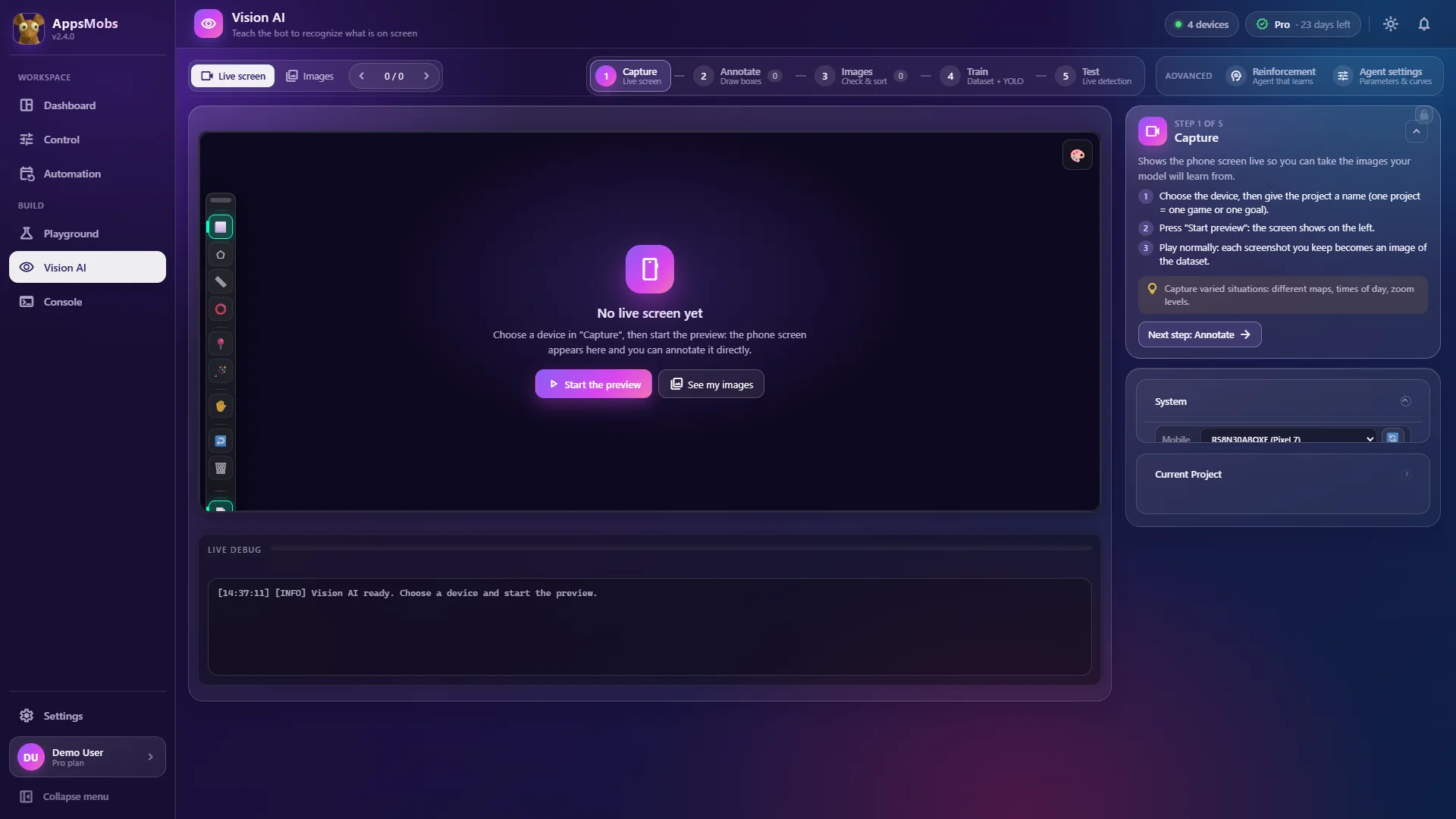
Module 03 · Vision AI · Pro and Ultimate
When coordinates break, it looks.
Capture, label, train a YOLO model and call it from a script. All inside the app, on your machine.
- 01
It recognizes the thing, not the position
The same script survives a new layout, another screen size, dark mode or a button that moves.
- 02
Assisted labeling
After the first boxes, the app suggests the next ones: you just correct.
- 03
Local training
No dataset leaves your PC, no GPU to rent. The weights are yours and export.
- 04
Reinforcement on Ultimate
Instead of scripting the decision, you define a reward and the agent learns on your own device.
The limits, honestly
Vision AI starts on the Pro plan. Quality depends on your captures: twenty images from one device won't cover another screen format.
Module 04 · Scheduling and pools
One script, one cadence, and you go to bed.
Every 30 minutes, every night at 3 am, on weekdays or just once, on a free device: the scheduler handles the rest.
- 01
A free device, not a serial number
Ask for "any free device" or a precise list, set how many run at once, or rotate to a different device on every run.
- 02
Every run leaves a trail
Timestamped log in the Console and, on a crash, a trace in "To handle". With screenshot(), you also keep the images you choose.
- 03
Restart and safety stop
A script that crashes is restarted on its own (3 times max in 10 minutes). A scheduled task stops after 3 failures in a row.
- 04
Tasks that are easy to manage
Run now, pause, duplicate or edit: all from the list, with the detail in the Console.
The limits, honestly
Scheduling assumes the app is running on the PC, and a missed run is not made up. No server-side agent keeps your jobs going when Windows is off.
Module 05 · Local by default
Your data stays home. Period.
The app only contacts our servers for two things. Click each item to see where it lives.
- 01
No cloud quota
Your limit is your PC. Not a run allowance.
- 02
Signed license
The check carries a device fingerprint, not your files.
- 03
Offline tolerated
A valid local license keeps working without a network: a drop doesn't stop a running job.
- 04
Readable folders
Scripts, screenshots and logs live in Documents\AppsMobs: back them up like any folder.
The limits, honestly
Because everything runs locally, a bigger fleet needs a bigger PC. Ten 1080p streams plus real-time inference is real load.
Stays on your PC
Leaves your PC (and nothing else)
Your scripts. They live in your project folder. They are never uploaded.
Requirements
Is your PC enough? Check in two clicks.
Tell us how many devices you run and whether you train models: we'll tell you what you need.
- System
- Windows 10 or 11, 64-bit
- Processor
- 4 cores minimum
- Memory
- 8 GB minimum · 16 GB recommended
- Graphics card
- Optional
- Disk
- 4 GB for the app, plus room for your datasets
- Devices
- Android 7 to 15 with USB debugging, or an LDPlayer emulator (other emulators: via ADB, unverified)
There is no macOS or Linux version today.
Enough reading. Plug in a phone.
Download the app, enable USB debugging and run your first script in ten minutes.